psuedo code
I personally feel that although at the moment I have very little knowledge on the subject I do feel with more time I can gain a better understanding on how to use it affectively. I also believe that this will help me and my team
Individual Roles:
Archie - Texture Artist / Animator / Coder
Luke - Concept Artist / Character Designer
Jordan - Level Designer
Gage - Animator
Responsibilities
Archie - I have to convert some concepts to pixel versions and create texture maps; assisting in animation (animate spirites drawn by Gage or Luke, give the sprites idle/running/walking/attacking animation along with Gage; and coding (create a character controller and simple AI for enemies).
Luke - Designing and turning the concepts into pixels for the characters, enemies and gems using photoshop. I will also be assisting with sound design, coding the characters interactions and character animation.
Jordan - Designing the levels and converting the concept art designs into pixels to create the areas using Photoshop or an online sprite builder.
Gage - I will be creating the animation for the character and multiple other things. I will be working on walk cycles, jumping etc. I will also be assisting in coding
Documenting Development
We intend to use Google Drive as a shared document that we can all edit and upload our work onto. This allows us to access each others work quickly and to see what everyone else is doing so we don't have an overlap. Then in blogger we can show the development process by gathering screenshots and annotating them to show the work we have completed.
Testing and Refinements
Ask people to test with video recording on them playing or just some note taking if the don't want to be recorded. Then take feedback from people and criticisms into account to improve our game as a whole.
Pixel characters
To make all these characters I used concept sketches form previous units as inspiration and then used the website make 8bit art. Using this website I created the following.
Goblin brute
Although I will improve upon the design of this character as we create more of the game, this will be the main style the character will have.
Although I will improve upon the design of this character as we create more of the game, this will be the main style the character will have.

Goblin thieve
In the early concept ideas for the game we wanted to have a goblin theive who would drop gems as he ran away. Although I like parts of the design, I dont think we will use the character due to the hood not looking affective enough.
In the early concept ideas for the game we wanted to have a goblin theive who would drop gems as he ran away. Although I like parts of the design, I dont think we will use the character due to the hood not looking affective enough.

The king
This design was an early idea of what a pixelated king could look like.

I then developed my idea of what the king could look like by doing some research into popular 8bit characters and the art style used. One of the characters I researched was mega man.

Possible sword design

After a few possible design ideas for the characters I moved onto creating the collectable gem that will be featured in the level.
I started with pixel outline for a gem/diamond.

I then chose a base colour for the gem.

I then chose a darker version of the gems main fill colour for the outline.

I then made the inside outlines white.

I then decided I wanted to add darker and lighter shades for different faces of the gem.


Finally I added a more greenish turquoise colour for the inside outline.

Gage then made an idol animation for the gem using Flash. The gem will look like this in the game untill you run through it and collect it.

make animated gifs like this at MakeAGif
I then moved on to creating different frames to help animate the walk cycle of a goblin. When making the individual images for the animation I made small changes to the colour and positions of the clothing.

This frame is when the goblin will be at its highest whilst running/walking.


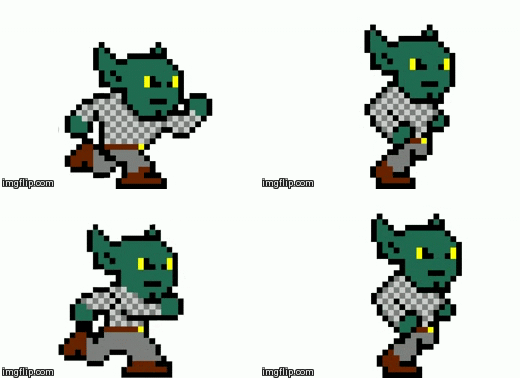
I then did the same for the king.
Again, like the goblin whilst making each frame I made small changes fromt he original design, wheather it be the size or colours.
Again, like the goblin whilst making each frame I made small changes fromt he original design, wheather it be the size or colours.


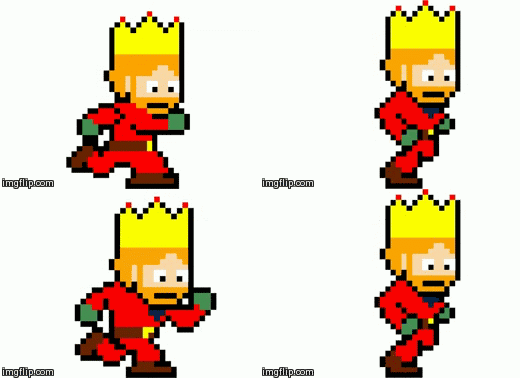
These two screen shots are of the idle positions that the king will take. The animtion of these two images will play when the king is stood still.


After working on these designs I moved on to making a better sword design.
To make this I did a lot of research into pixel swords used on popular games like mine craft aswell as real swords. Whilst doing the research I again found that the common colours for kings weapon would be red, gold and silver.
To make this I did a lot of research into pixel swords used on popular games like mine craft aswell as real swords. Whilst doing the research I again found that the common colours for kings weapon would be red, gold and silver.

After making a final design for the sword me and Gage moved onto making an animtion for the king holding the sword. When creating the king holding the sword we realised it would be incredibly difficult to make him hold the sword we designed before and for it to look natural. This meant we had to change the style we made it in so it would be easy for the king to hold the sword and so it would still look natural. When making the sword we made sure we sticked with the colour scheme we chose before because it had gotten good feedback.


Me and gage then moved onto designing a shield as decoration for the castle walls to give the scenery a more effentic look.
We started with the basic outline and the colurs we felt fit in best. At the start we couldnt decide weather the gold line should be 1 or 2 pixels wide.

As we still couldnt decide we added the patterns we wanted to use to help us make our mind up.


After deciding on the shileld we wanted to use we deiced to add two swords behind it to make look like what might be hung on castle walls.

We then moved on to creating more bits of scenery for the level like terrain and more items to pace on the walls. Gage mainly focused on making the floor/wall blocks whilst I made the flags.

I then moved on to making the door that will be seen in the background during the menu screen.
Once I had on side of the door built I duplicated it and flipped it to make a grand door. To make the door I used make 8 bit art. After i had finished an outline for the door I made another, this one was 2 pixles down and this was to make shading. I then added another outline on the outside for the wall to link the door to the castle. I then made the detail lines like where the barriers will go on the door aswell as the gaps in the palnks used on the door. Once I had finished this I coloured it using multiple base coats and then adding darker and lighhter shades like we did on the terrain blocks.

I then moved onto creating some scenery that would also serve a purpose to stop the player from moving backwards of the map. To make this I again used make 8 bit aert and then once I had the made outline and fill Gage helped me with getting the right colour schemes and shading done.

This is going to be one of the buttons that will be seen on the game menu. Gage made the main template and I helped with the textures and the font used.

This is what the tittle is going to look like on the main menu. At the first test for the game the text was just written on a plain block. I then had the idea of placing it on an open scroll to help add to the medievil fantasy theme. To make the scroll I we used photoshop to create the shapes and after we had the basic shapes made we moved on to creating the textures. Many of the texture we got off of google and then changed the colours and overlay on certain parts of the texture. Looking back at the scroll now that we have put it into the game I think it might not fit in too well because of the art style doesnt seem to fit in with the pixelated scenery.

After making the main scenery me and Gage put all the differnt blocks together to create this. Overall I am pleased with how all this looks. At the start the background was very plain and bland but after a few days of work we have managed to make the background look like this. All the items we used were typical things to find on the outisde of real castles in their prime or fantasy castles we have seen in films or game.

After making the background we added the buttons with links to the controls or to paly the game aswell as the title. Although I like the individual aspects of the scenery or buttons I do think that the title doesnt stand out enough.

For the 3D game I wanted to make a simple maze level. To make the level I will be using Unity.

No comments:
Post a Comment