Translate

Tuesday, 10 February 2015

Unit 67


Gathering the team
 Notes  Plot of the game Roles of the team             If you a smaller role, may need to pick up other roles Choosing the right people for the right tasks           -Know each others capabilities Be honest with the game and the people -       Honesty is the best policy
 Make sure you are all on board Focus  Good communication within the team  Don’t be precious about your ideas Accept criticism gracefully Prepare for ideas to be shelved or changed  Deadline Work schedule
  Individual rolesConcept designer/ character design/ Responsibilities  How are you going to document the development process?  How are you going to show evidence of testing and refining your game development outcomes as individuals in a team and the team as a whole?


psuedo code

I personally feel that although at the moment I have very little knowledge on the subject I do feel with more time I can gain a better understanding on how to use it affectively. I also believe that this will help me and my team 


Individual Roles:

Archie - Texture Artist / Animator / Coder


Luke - Concept Artist / Character Designer


Jordan - Level Designer


Gage - Animator 


Responsibilities


Archie - I have to convert some concepts to pixel versions and create texture maps; assisting in animation (animate spirites drawn by Gage or Luke, give the sprites idle/running/walking/attacking animation along with Gage; and coding (create a character controller and simple AI for enemies).

Luke - Designing and turning the concepts into pixels for the characters, enemies and gems using photoshop. I will also be assisting with sound design, coding the characters interactions and character animation.


Jordan - Designing the levels and converting the concept art designs into pixels to create the areas using Photoshop or an online sprite builder. 


Gage - I will be creating the animation for the character and multiple other things. I will be working on walk cycles, jumping etc. I will also be assisting in coding

Documenting Development

We intend to use Google Drive as a shared document that we can all edit and upload our work onto. This allows us to access each others work quickly and to see what everyone else is doing so we don't have an overlap. Then in blogger we can show the development process by gathering screenshots and annotating them to show the work we have completed.
Testing and Refinements
Ask people to test with video recording on them playing or just some note taking if the don't want to be recorded. Then take feedback from people and criticisms into account to improve our game as a whole.


Pixel characters

To make all these characters I used concept sketches form previous units as inspiration and then used the website make 8bit art. Using this website I created the following.

 Goblin brute
Although I will improve upon the design of this character as we create more of the game, this will be the main style the character will have.

Goblin thieve
In the early concept ideas for the game we wanted to have a goblin theive who would drop gems as he ran away. Although I like parts of the design, I dont think we will use the character due to the hood not looking affective enough.

The king

This design was an early idea of what a pixelated king could look like.

I then developed my idea of what the king could look like by doing some research into popular 8bit characters and the art style used. One of the characters I researched was mega man.

Possible sword design


After a few possible design ideas for the characters I moved onto creating the collectable gem that will be featured in the level.

I started with pixel outline for a gem/diamond.

I then chose a base colour for the gem.


I then chose a darker version of the gems main fill colour for the outline.


I then made the inside outlines white.


I then decided I wanted to add darker and lighter shades for different faces of the gem.


Finally I added a more greenish turquoise colour for the inside outline.
Gage then made an idol animation for the gem using Flash. The gem will look like this in the game untill you run through it and collect it.
PD6aQR on Make A Gif, Animated Gifs

make animated gifs like this at MakeAGif

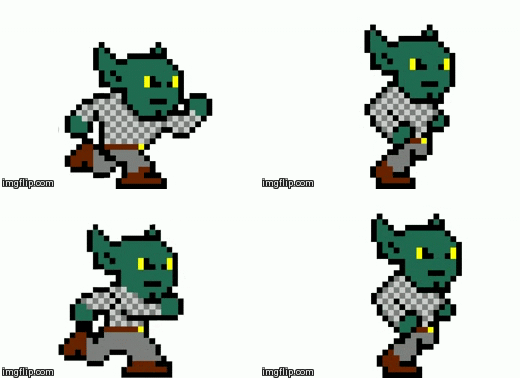
I then moved on to creating different frames to help animate the walk cycle of a goblin. When making the individual images for the animation I made small changes to the colour and positions of the clothing.

This frame is when the goblin will be at its highest whilst running/walking.


This is the animtion of the goblin that will be used in the game. In the game the animtion will be more smooth. We made the animtion in flash.


I then did the same for the king.
Again, like the goblin whilst making each frame I made small changes fromt he original design, wheather it be the size or colours.


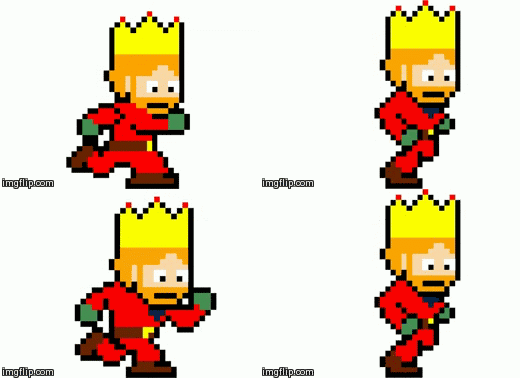
This is what the animation in the game will look like. In game the animation will be more smoother and fluid. To make the animtion we used flash.


These two screen shots are of the idle positions that the king will take. The animtion of these two images will play when the king is stood still.


After working on these designs I moved on to making a better sword design.
To make this I did a lot of research into pixel swords used on popular games like mine craft aswell as real swords. Whilst doing the research I again found that the common colours for kings weapon would be red, gold and silver.


After making a final design for the sword me and Gage moved onto making an animtion for the king holding the sword. When creating the king holding the sword we realised it would be incredibly difficult to make him hold the sword we designed before and for it to look natural. This meant we had to change the style we made it in so it would be easy for the king to hold the sword and so it would still look natural. When making the sword we made sure we sticked with the colour scheme we chose before because it had gotten good feedback.


Me and gage then moved onto designing a shield as decoration for the castle walls to give the scenery a more effentic look.
We started with the basic outline and the colurs we felt fit in best. At the start we couldnt decide weather the gold line should be 1 or 2 pixels wide.

As we still couldnt decide we added the patterns we wanted to use to help us make our mind up. 


After deciding on the shileld we wanted to use we deiced to add two swords behind it to make look like what might be hung on castle walls.


We then moved on to creating more bits of scenery for the level like terrain and more items to pace on the walls. Gage mainly focused on making the floor/wall blocks whilst I made the flags.


I then moved on to making the door that will be seen in the background during the menu screen.
Once I had on side of the door built I duplicated it and flipped it to make a grand door. To make the door I used make 8 bit art. After i had finished an outline for the door I made another, this one was 2 pixles down and this was to make shading. I then added another outline on the outside for the wall to link the door to the castle. I then made the detail lines like where the barriers will go on the door aswell as the gaps in the palnks used on the door. Once I had finished this I coloured it using multiple base coats and then adding darker and lighhter shades like we did on the terrain blocks.

I then moved onto creating some scenery that would also serve a purpose to stop the player from moving backwards of the map. To make this I again used make 8 bit aert and then once I had the made outline and fill Gage helped me with getting the right colour schemes and shading done.

 This is going to be one of the buttons that will be seen on the game menu. Gage made the main template and I helped with the textures and the font used.

 This is what the tittle is going to look like on the main menu. At the first test for the game the text was just written on a plain block. I then had the idea of placing it on an open scroll to help add to the medievil fantasy theme. To make the scroll I we used photoshop to create the shapes and after we had the basic shapes made we moved on to creating the textures. Many of the texture we got off of google and then changed the colours and overlay on certain parts of the texture. Looking back at the scroll now that we have put it into the game I think it might not fit in too well because of the art style doesnt seem to fit in with the pixelated scenery.


After making the main scenery me and Gage put all the differnt blocks together to create this. Overall I am pleased with how all this looks. At the start the background was very plain and bland but after a few days of work we have managed to make the background look like this. All the items we used were typical things to find on the outisde of real castles in their prime or fantasy castles we have seen in films or game.


After making the background we added the buttons with links to the controls or to paly the game aswell as the title. Although I like the individual aspects of the scenery or buttons I do think that the title doesnt stand out enough.


For the 3D game I wanted to make a simple maze level. To make the level I will be using Unity.


Thursday, 27 November 2014

Unit 61

  • How does this example meet the rationale of the unit brief? 
  • What is the environmental impact of the device? 
  • How will this device inspire your own ideas for designing an interactive product?

Wind up chair
The chair meets the rational beacause the chair is made out of wood which could of already been recycled and could be recycled after the product is no longer of use. The product is also interactive because you have to twist the key in order to charge your phone. This also makes the chair enviromentally friendly because it can charge your phone without being connected to a wall socket, which helps stop global warming. This product inspires me in a way due to the simple yet effective nature of the item.


e-QBO cube
The e-QBO cube is a giant cube that uses solar energy to charge street lights, phone charging and wifi hotspots. The cube uses photovoltaic pansels during the day to charge up on solar energy and is stored in batteries, this means that the cube is environmentally friendly due to it not being plugged into anything.


LED Cube 8x8x8

This is a cube made out of connecting LED lights in an 8x8x8 style. You then flick a switch and the lights will flash in sequences showing interesting patterns. This cube has a relation to the rational because the cube is interactive, in the fact you push a button and the LEDs will flash in a sequence. The cube is also environmentally friendly because of it can be made using recycled LED lights. This cube has probably inspired me the most out of all the devises I have done research on, this is because from the start of the project I knew I wanted to use LED lights in a sequence of some sorts.

Possible Idea
I have a rough idea of a shape like a circle or square with another smaller circle/square made out LED's and if the devise is turned on it will convey patterns and sequences. The lights can be the same colour or different colours. the lights could be placed on a simple disc or square shaped base. After I had a basic idea I moved onto some basic sketches of what my design could look like and how people interact with it.

I believe my idea will fit in with the brief for a few reasons. One of which is that I aim to only use recycled parts for my product and the only item that won't be is the arduino. Another reason is that my product will be reusable and will only require batteries so there will be no need to plug the product in to a mains.

After working on sketches I moved on to creating a basic prototype using basic materials like cardbourd, card and sticky notes. This was to help me gain a better understanding on what it could look like in my hands. The sticky notes were used to display where the LED lights will go (the number of sticky notes wont be the same as the amount of LEDs) and under neathe the notes labeled OFF were notes labeled flash to symbolise when the LED would light up.


After creating this I asked a class mate to have a look at it and I filmed myself asking a few questions.


I found the feedback I recieved helpfull because I agreed with all the constructive criticisms. After making the cardboard prototype I realised that the shape and size was not good or affective for what I wanted to create.


Legal, Ethical and Moral isues
One of the most important features of creating a product is too make sure it doesn't include any legal, ethical or moral issues. 

Legal
I personally dont think that my product will infringe on any laws. One of the reasons is because I have yet to find any product this is similar to mine which is copy writed(I am still searching).
Another thing I could include if my product has packaging is to have the small logos of wheather there are choking hazards ect.

Moral
I believe my product will affect people in a more posotive way than negative way. This is because I want to use recycled products for the project. Aswell as using recyled products, I want to help encourage recycling.

Ethical
In my opinion I believe that my product will be ethical becasue in all honstety I dont understand how anyone could find a sign that has flashing LED offensive to them as a person or a religion. I understand that if the sign had a religious simbol or anti religious simble then it would be offensive but after doing research I know that the recycling logo is not offensive.


Circuit desk prototypes

In order to be able to create any practicle work I need to learn all the basices of circuitry and arduinos. To do this I am going to learn how to turn an LED on and off, to make an LED flash and more.

The first circuit I worked on was to build a simple circuit using a battery, LED, Risistor and a button. Whilst creating the circuit I encountered a problem with the risistor not working which lead to the LED breaking due to the light being too bright and powerfull. The reason this was happening was because I had placed the risistor facing up and down as appose to it going from left to right.

I then moved on to learning how to use an arduino to make an LED blink on and off with any buttons being pressed. To make this I followed a simple tutorial on a arduino website. First I started by placing an LED to a board and joined it to an arduino by using a wire to connect the LED to the GND output. I then connected a resistor to the 13 output and then connected the resistor to the LED.


After making one LED blink I wanted to see if I could make multiple LED blink. I started to experiment by connecting both LED cathode terminals. I then connected the anode cathode to the resistor. After I did this I discovered that it works and decided to add another two LED.


I then moved on to learning how to get the LED flashing a random sequence. This is what I did.

Aswell as placing the LED ans wiring in certain places, I also had to edit the code in order to get the LED to flash like they do. This is the code I used.

int timer = 100;        
int ledPins[] = {
  2, 7, 4, 6, 5, 3 };    
int pinCount = 6;        

void setup() {

  for (int thisPin = 0; thisPin < pinCount; thisPin++)  {
    pinMode(ledPins[thisPin], OUTPUT);    
  }
}

void loop() {

  for (int thisPin = 0; thisPin < pinCount; thisPin++) {
 
    digitalWrite(ledPins[thisPin], HIGH);
    delay(timer);                
 
    digitalWrite(ledPins[thisPin], LOW);  

  }


  for (int thisPin = pinCount - 1; thisPin >= 0; thisPin--) {
 
    digitalWrite(ledPins[thisPin], HIGH);
    delay(timer);
 
    digitalWrite(ledPins[thisPin], LOW);
  }
}

After making this I asked a fellow class member to test/ review my current virtual prototype and answer a few questions.


After recieving the feed back I am going to continue to look into learning how to get the LED flash in a set sequence instead of a more random sequence.

After doing a bit of research I have found a possible way of getting the LED to flash from left to right.
This is what I have got so far.


This is the code I have used for this circuit.
// the setup routine runs once when you press reset:
void setup() {
  // initialize the digital pin as an output.
  pinMode(0, OUTPUT);
  pinMode(1, OUTPUT);
  pinMode(2, OUTPUT);
  pinMode(3, OUTPUT);
  pinMode(4, OUTPUT);
  pinMode(5, OUTPUT);


  pinMode(8, INPUT);
}


int led = 0;
// the loop routine runs over and over again forever:
void loop() {
  if (digitalRead(8)) {
    for(int i=0; i<6;i++) {
      if(i==led) {
        digitalWrite(i, HIGH);
      } else {            
        digitalWrite(i, LOW);  
      }            
    }
    led++;
    if (led >5) led = 0;
  } else {
    for(int i=0; i<6;i++) {
      digitalWrite(i,HIGH);
    }
  }
  delay(1000);            // wait for a second
}


This is another 123 circuit simulator but this one is a nomal chaser sequence that goes back and fourth.


Here are some photos and videos of me trying to get the leds to flash.


When it came to making my product it really didn't go well for a number of reasons. One of the main reasons was that the codes that were succesfull on the 123d circuits did not work and had errors that I was unable to solve. Another big issue I had during the production fase was that multiple LED broke which lead to multiple visits to shops to purchase more, this ate up a lot of the time I was hoping to spend on creating the product. Aswell as this, simple things went wrong such as being able to light up multiple LED which was the sole purpose for me on this unit. When I encountered these problems I worked with other students to try and work out why these things didn't work and they were unable to help.

Overall I am very dissapointed with the practical element of my work for a number of reasons with the biggest being that I could only get one LED to work properly because everyt time I added another one the first one would dim massively or stop flashing al together. I also put this down to big lack of knowledge of electronics and to make/create things like this. Going into this unit I had no experiance of even basic electronics at school and had to learn on my own as we moved on with this unit which made me fall behind still trying to learn the basics. I believe if I had more time I would be able to create something mor close to my original plan/design. This is beacause although I am still confused on how to make circuits and LEDs work in certain I do feel I have a much better undertanding than I did when I started this unit.

Wednesday, 8 October 2014

Unit 68


At first I started to research different games on different platforms with different genres.


Game comparison

For this bit of research I am going to compare two different games from different years but with similar lineage. The two games I shall be comparing is Rayman (1995) and BattleBlock Theatre (2013).

Rayman is a 2D side scrolling platfrom game where you navigate you're way through different levels and worlds with the goal of rescuing collecting lums and rescuing the electoons. Whilst also plotting to stop Mr Dark from ruling the world. The game play is simple but very challenging which makes the game appeal to a wide audience of children and older people.
BattleBlock Theatre is also a 2D side scrolling platform game but this game has different goals and objectives. The objective is to navigate you're way through a level to collect enough jems to exit the level, once you have finished 9 levels there will be a similar level but this time round you have an allotted time to complete it.

Another comparison between the two games is the colourful and sureal art style. Which appeal to a larger audience due to younger people liking bright and interesting colours aswell as older people usually do aswell. As well as the bright and surreal art style the levels get a lot harder the further you advance. Both games do this by making the puzzles and obsticles more difficult to navigate.

RaymanBattleblockcover.png


Game Pitch work
This picture is the original screenshot of our original idea for the game.

After our original idea we moved onto creating a game with a similar concept but in a fantasy world and with more playable characters. The point of the game was that the royal jewels were stolen and you would play as part of the royal family or their trusted allies on the hunt to reclaim the jewels. On you're journey you will come up againts goblin thieves and wild animals. At the current moment we have planned to have four playible characters with the possibility of adding more.
We then moved on to creating a simple list of the ideas of the futher developed game. These also feature the original rough character concept drafts.


(we decided to not include the knight in the first release, we do have an idea of releasing DLC with the Knight Prince and Princess)

The main idea we had was to create a 2.5D sidescrolling platfromer. We wanted to take inspiration from some of the best games in the genre but wanted to keep it fresh and different. A way of doing this was to combine genres like hack and slash with collecting items and certain amounts of them. We also wanted to add an RPG style to the game in terms of leveling up an attack or deffense. The game will also feature multiplayer Co-op aswell as single player. We wanted to add this to add even more of a replay value to the game. Our target audience will be age 7 and up, we chose this rating after looking at the PEGI ratings and finding that 7+ was the best for our game.


Me and Gage then moved onto creating the rough script for the pitch video. When we move onto filming we will only use this as a rough guidence point if we get stuck but we will mainly be speaking in our own words.


(individual work)
After we had filmed all the pitch I moved onto drawing some concept art for the game. I started with a rough idea for the logo


Once I digitized the an idea i gave it to Gage who then went on to make an improved version on Cinema 4D and then animated it to put at the begining of the pitch. Whilst making this I realised how bad the wizards staff looked, so when I gave the image to Gage to remake in 3D I made sure that we used two swords instead of the staff.


I then moved on to creating ideas for the characters.
I started with designing the first playable character, the King.


 After sketching the king I digitised him using photoshop.


After I did that I decided to see waht the king would like in a pixel form.


I then went on to designing the secind playable character, the Queen.


I then digitised one of the sketches.


I then designed the Jester.


I then digitised one of the sketches.


And the last playable character I designed was the Wizard.


I then digitised one of the sketches.


I then designed what a basic goblin theif could look like.


I then digitised one of the sketches.


I then did the same for some of the boss goblins. When designing the rough concepts for the bosses I wanted to make sure they all looked like goblins but all had individual looks such as a large or small build. I also wanted to make sure that there weapons were all different.


I then started to digitise some of them.


Looking back at the drawings im not that impressed with them. This is because I dont see them being good enough to attract people other that the target audience to the game. Although I am pleased with the  pixel concept art I created and I do believe that those bits of concept art are the most affective.


This was the first rough draft of the pitch video. Me and Gage edited the footage we had at the time, wich wasn't too much. When we had all the footage we need, Archie started to do the editing.


I think this draft was poor and didnt really explain enough about the game. It was just us talking to the camera which is pretty boring. We also didint explain the game no where near well enough.

After gathering more footage we moved onto to our final pitch, which was mainly edited by Archie.


The pitch was then sent to three Industrial panel members to give feed back; these were the points they made.


After recieving the feedback I agree with most of it, I do feel the video although it was a major improvement from the previous video still isnt good enough to give us the slightest chance of getting funding. I feel the begining of the pitch was definately not proffesional enough due to it just starting with me speaking, I feel that the animation at the end should be moved to the begining to give a more profesional feel. I also feel that we struggled to find a way of describing the game and why it may vary from other games similar in the structured time we had and the fact the video was too long it didnt help. I feel we should of probably filmed more takes cause although it adds a realistic feel to the video at times we stuttered or didnt really know where we were going. I also believe that we may not have appelead to our target audience which we may of not made clear in the pitch. A way we could of done this would of been describing the concepts wiht more visuals and less talking. (part of this was done after initial feedback)


10 pager

In the 10 pager we initially split the pages up for different people to take part in. I selected the Enemies, playable characters, title and the game experience. I started writting the pages on a word document before transfering them aswell as what ohter people had written to the 10 page game document.

Enimies

As you advance through the games levels and worlds, you will come up against a range of different enemies. In the first area, the castle grounds you will mainly come up against goblin soldiers and thieves. At the end of the last level in the first area the boss will be a Goblin Brute leader.
The Goblin Brute leader is a fierce and blood thirsty goblin who has one goal in life, to kill anything that isn't a goblin(most of the time). The Brute is heavily armoured which means he is high in health with strong hits but slow in speed and mobility.
In the second area which is the village you will come up against some goblin thieves again as well as a few angry farm animals like chickens and sheep. At the end of the last level in the second area the boss battle will be a Goblin Farmer.
The Goblin Farmer is an overweight lazy goblin who spends its days stealing the villager farmers produce and using it to widen his belly. The Goblin Farmer wears minimal clothing (due to it not fitting) so his health. Due to his weight, he is slow and weak. That is why in his boss battle he sends out his crazed farm animals to do his work.
The third area will be the woods. In this area there will still be goblin thieves but less of them due to the amount of wild animals living in the woods such as bears and foxes. At the end of the last level of the woodland there will be another boss battle against a Goblin Hunter.  
The Goblin Hunter is a small skinny Goblin that spends his time silently stalking his prey deep in the woodlands. The Goblin Hunter is very quick and quiet on his feet and mainly attacks using his trusted bow although the lower his health gets the more wild he will become, forcing him to use his dagger to kill his prey.
The fourth area will be deep and dark caverns only inhabited by blood thirsty bats and a deranged Goblin many believe to be a myth. This Goblin has lived in the shadows for most of his life conquering his fears and thus has become BatGob.
BatGob is a crazy goblin who has isolated himself away from his own kind in order to conquer his fears. Due to a lack of social life (not that Goblins have much of a civilised one) he has donned a suit inspired by his biggest fear, Bats. BatGob will glide from ledge to ledge throwing strangely shaped daggers and knives before swooping in for strong punches and kicks.
The final area you will travel to is the Goblin Kingdom itself. Here you will have to fight your way through Goblin soldiers, villagers and thieves before coming up against the Goblin King.
The Goblin King is tall, strong and strangely intelligent for a Goblin. The Goblin King wants nothing more than a fare life for his people but believes the only way of doing this is to steal and kill there way to peace. The Goblin King holds a giant staff and at the top is the skull of what is rumoured to be the devil. His attacks are strong and rapid meaning the only way to defeat him is to outsmart him tactically.
Character sheets

Character Profile Sheet

Character Name: The King

Gender: Male

Age: 45

Marital Status: Married

Spouse: The Queen

Children: The Prince and The Princess

Hair: Brown with a ginger beard

Eyes: Black and white

Appearance: Slightly overweight wearing the finest clothing all of which is the colour red or green.

Ethnicity: Caucasian

Friends/Allies: The royal advisor, the wizard and the jester

Likes: Food, money and hunting

Health: High

Strength: Average

Speed: Average

Weapons: A big broad sword with two attacks, normal: average  heavy: slow but heavy


Background: The king came in to power very early in his life due to his parents both being murdered during a goblin invasion and due to his parents not having any other children he was put on the throne at the age of 14. Although being advised his hole life, the king has always had the mindset of if he wants or likes something its his. After meeting the woman he was to marry and have two children, she managed to change his ways but only slightly.


Character Profile Sheet


Character Name: The Queen


Gender: Female

Age: 30

Marital Status: Married

Spouse: The King

Children: The Prince and The Princess

Hair: Brown

Eyes: Black and white

Appearance: Petite woman with a long green dress with gold jewellery.

Ethnicity: Caucasian

Friends/Allies: The royal advisor, the wizard and the jester

Likes: Family and caring for others

Health: Low

Strength: Low

Speed: High

Weapons: A rapier sword with two attacks, jab: low  slice: average

Background: Before marrying the King, the Queen was one of the kingdoms healers. She would spend most of her days caring for the sick and wounded. One day the King had a fever and needed medicine and the moment they met the pair fell in love and a year later were married and had their first child, The Prince and few years later the Princess was born.


Character Profile Sheet


Character Name: The Jester

Gender: Male

Age: 24

Marital Status: Single

Hair: Short Blonde (can't be seen under his giant hat)

Eyes: Black and white

Appearance: Average weight with a purple and yellow jester costume including a matching giant hat.

Traits: Very clumsy and dumb

Ethnicity: Caucasian

Parents /Guardians: King and Queen of comedy

Friends/Allies: The royal family and the Wizard

Likes: Comedy

Health: Average

Strength: Ranged attack: weak but rapid            Melee: Strong but slow

Speed: High

Weapons: Juggling balls (Ranged) and a giant chicken leg (Melee)


Background: The man only known as "The Jester" was born into the royal family of comedy (not to mistaken with the main royal family). But due to his dumb and clumsy nature and having ruined countless comedy routines he found himself neglected by his family. In an attempt to get a fresh start the jester left his family and home in search of a new life, which lead him to the Main Kingdom. HIs first job in the kingdom was to look after the stables but one day in a strange circumstance made a fool of himself in front of the King, which then lead to the King deciding to make him his personal Jester.


Character Profile Sheet

Character Name: The Wizard

Gender: Male

Age: N/A

Marital Status: Single

Hair: Grey and white with a great big bushy beard

Eyes: Black and white

Appearance: Skinny and boney old man wearing nothing but a long dark blue robe with a matching pointy hat.

Ethnicity: Caucasian

Friends/Allies: The royal family, jester and the royal advisor

Like: Magic, reading and pipes

Health: Average

Strength: Ranged attack: high      Melee: low with a knockback effect

Speed: Low


Weapons: Wizard Staff shoots fireballs for ranged attack and for his melee he clumps the enemies on the head with it

Background: The man who is only known as "The Wizard" has been working alongside the royal family for generations and know one, even the wizard himself knows how long he has been alive for. All the wizard can truly remember is that it is his duty to work for the royal family and help advise them should they need it. The wizard seems to most people like a high, crazy old man but once they see him in combat with his magic abilities they soon learn he has talent, swell as being a high, crazy old man.


After initially creating the enemies and character sheets on word I moved onto placing mine and other peoples pages onto the template Archie intially created.


After I recieved the template I realised that the font for the main text was not easy to read considering the amount of content we had for each page, I then moved onto finding a more appropriate and readable font.
Once I had done this I started to place the pages I had written aswell as the others on to the template.


These are the character sheets.


The character concept page will be changed when I can finish creating the the Queen and Jester in an 8bit style.

Once I had done these I moved onto creating the Game Experience.


This is the whole 10 pager document. I have written four different subjects and edited them all to fit the template Archie created. After I put everythng in the template I made them all jpegs.

(1)

(2)


(3)


(4)


(5)


(6)

(7)


(8)


(9)

(10)


10 pager evaluation (after initial deadline)
Looking back at the whole 10 page document, I am quite pleased with the outcome.  I believe the design of the document is visual pleasing and makes me interseted in what the content is. A down side to the document is that it is still not the easiest to read if the sheet isn't directly infront of you or if the image is large. Another down side is due to the amount of content we created meant that the pages are either going to be very cluttered or we will have to create even more pages if we had the font size larger than it was. I believe the colour scheme is affective in conveying a fantasy medevel environment. The colours used are the most traditional royal colurs such as red and yellow. If you know nothing about the game but look at the first page you instantly get a rough picture of what themes the game links to. I belive the document looks like it can be close to what some profesional companies could use.

Overall evaluation (after initial deadline)
In my opinion the solo work I did wheather it was part of the group or before we were put into groups was my best work. I believe because not every one in the group was eager to help or pull their own weight in the tasks which lead to me and one other having to do the work we were missing because of these people. This lead to some aspects being rushed such as parts of the pitch video due to team members not showing up when they were expected to help out, this meant that those of us who did show up had to film there scenes which meant we had less time to get the scenes correct or to edit them efectively. This was also the case when creating the other content of work for the pitch because we only really had the concept sketches I had created aswell as one or two other images. Overall I am pleased with the work I managed to produce in terms of the research and 10 page work but I do feel certain members/parts of the group let the quality of work drop.